To setup SNMP for Sonus, please use the follwing reference:
https://support.sonus.net/display/UXDOC50/Sonus+SBC+1000-2000+Download+Center
Note also that community string should be low case, check firewall settings for UDP 162 and 161.
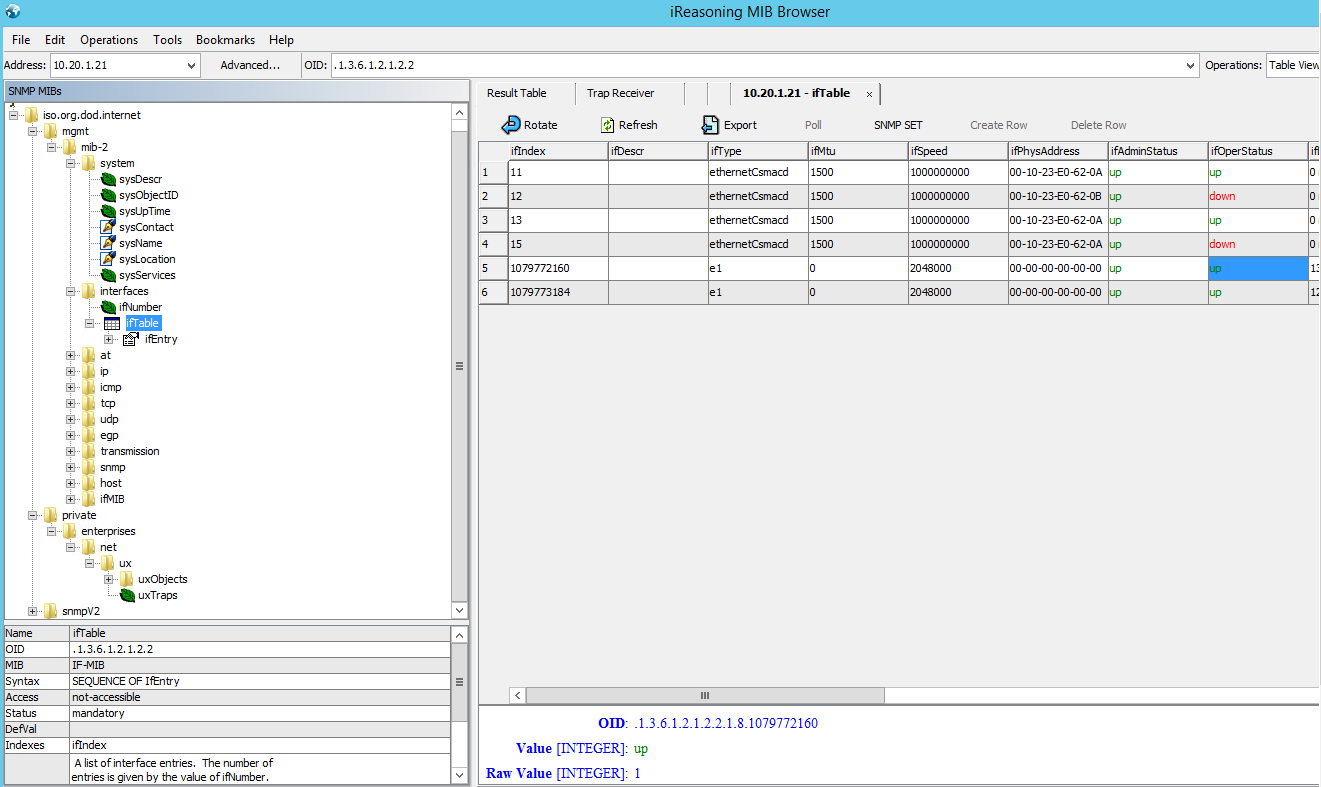
Use MIB browser to crack OID code for specific interface you want to monitor.
As example:
Search This Blog
Showing posts with label Network. Show all posts
Monday, July 2, 2018
Thursday, April 13, 2017
Wireshark filter an IP out
To filter out undesirable IP do not use !=
but rather
but rather
! ( ip.addr == 10.43.54.65 )
Wednesday, November 16, 2016
Ncat: Could not resolve hostname "ûs": No such host is known. . QUITTING.
If you have this message running ncat, probably you copy-pasted a command line from internet and some symbols are Unicode, retype command by hand. check symbol "-"
Thursday, July 21, 2016
Direct access watchdog
We have an instability when we use Direct Access NLB and ESX E1000 adapters. It stops working randomly. As a temporary workaround we created a script that can monitor and reset failed adapters.
in long run we want to change to VMXNET3 adapters that are more stable.
@echo off
echo This is a DA watchdog, pls do not close. it will stop every day when hour is 00
eventcreate /ID 998 /L APPLICATION /T INFORMATION /SO DA /D "Direct Access network adapter watchdog is started"
:LOOPPING
set HH=%TIME: =0%
set HH=%HH:~0,2%
set MI=%TIME:~3,2%
echo %HH%
if "%HH%" == "00" goto Quit_here
ping -S vip-public -n 1 public-gw >nul
if errorlevel 1 goto NoServer_public
ping -S vip_private -n 1 private_gw >nul
if errorlevel 1 goto NoServer_private
timeout /t 60 >nul
goto LOOPPING
:NoServer_public
echo Check again
eventcreate /ID 997 /L APPLICATION /T WARNING /SO DA /D "Direct Access DMZ public gateway stopped responding, we will check again to be sure"
timeout /t 10 >nul
ping -S vip-public -n 1 public-gw >nul
if errorlevel 1 goto RESET_PUB
goto LOOPPING
:RESET_PUB
echo we have a problem - refer to eventlog event 999
eventcreate /ID 999 /L APPLICATION /T ERROR /SO DA /D "Direct Access DMZ public gateway stopped responding, we will reset adapter"
powershell -Command "& restart-netadapter 'Public DMZ'"
timeout /t 60 >nul
goto LOOPPING
:NoServer_private
echo Check again
eventcreate /ID 997 /L APPLICATION /T WARNING /SO DA /D "Direct Access DMZ private gateway stopped responding, we will check again to be sure"
timeout /t 10 >nul
ping -S vip_private -n 1 private_gw >nul
if errorlevel 1 goto RESET_PRIV
goto LOOPING
:RESET_PRIV
echo we have a problem - refer to eventlog event 999
eventcreate /ID 999 /L APPLICATION /T ERROR /SO DA /D "Direct Access DMZ private gateway stopped responding, we will reset adapter"
powershell -Command "& restart-netadapter 'Private DMZ'"
timeout /t 60 >nul
goto LOOPPING
:Quit_here
echo we finish script every day at 00:
in long run we want to change to VMXNET3 adapters that are more stable.
@echo off
echo This is a DA watchdog, pls do not close. it will stop every day when hour is 00
eventcreate /ID 998 /L APPLICATION /T INFORMATION /SO DA /D "Direct Access network adapter watchdog is started"
:LOOPPING
set HH=%TIME: =0%
set HH=%HH:~0,2%
set MI=%TIME:~3,2%
echo %HH%
if "%HH%" == "00" goto Quit_here
ping -S vip-public -n 1 public-gw >nul
if errorlevel 1 goto NoServer_public
ping -S vip_private -n 1 private_gw >nul
if errorlevel 1 goto NoServer_private
timeout /t 60 >nul
goto LOOPPING
:NoServer_public
echo Check again
eventcreate /ID 997 /L APPLICATION /T WARNING /SO DA /D "Direct Access DMZ public gateway stopped responding, we will check again to be sure"
timeout /t 10 >nul
ping -S vip-public -n 1 public-gw >nul
if errorlevel 1 goto RESET_PUB
goto LOOPPING
:RESET_PUB
echo we have a problem - refer to eventlog event 999
eventcreate /ID 999 /L APPLICATION /T ERROR /SO DA /D "Direct Access DMZ public gateway stopped responding, we will reset adapter"
powershell -Command "& restart-netadapter 'Public DMZ'"
timeout /t 60 >nul
goto LOOPPING
:NoServer_private
echo Check again
eventcreate /ID 997 /L APPLICATION /T WARNING /SO DA /D "Direct Access DMZ private gateway stopped responding, we will check again to be sure"
timeout /t 10 >nul
ping -S vip_private -n 1 private_gw >nul
if errorlevel 1 goto RESET_PRIV
goto LOOPING
:RESET_PRIV
echo we have a problem - refer to eventlog event 999
eventcreate /ID 999 /L APPLICATION /T ERROR /SO DA /D "Direct Access DMZ private gateway stopped responding, we will reset adapter"
powershell -Command "& restart-netadapter 'Private DMZ'"
timeout /t 60 >nul
goto LOOPPING
:Quit_here
echo we finish script every day at 00:
Tuesday, May 31, 2016
Direct Access KDS issue
On the Direct Access server I could not start KDS proxy server.
Errors:
Log Name: System
Source: Service Control Manager
Date: 31.05.2016 20:23:53
Event ID: 7023
Task Category: None
Level: Error
Keywords: Classic
User: N/A
Computer:
Description:
The KDC Proxy Server service (KPS) service terminated with the following error:
Access is denied.
Log Name: Microsoft-Windows-Kerberos-KdcProxy/Operational
Source: Microsoft-Windows-Kerberos-KdcProxy
Date: 31.05.2016 20:23:53
Event ID: 5
Task Category: (1)
Level: Critical
Keywords:
User: NETWORK SERVICE
Computer:
Description:
Service failed to register UrlPrefix https://+:443/KdcProxy: error code 0x5. Contact your administrator to make sure https://+:443/KdcProxy is properly reserved.
Solution to run:
netsh http add urlacl url=https://+:443/KdcProxy user="NT AUTHORITY\NETWORKSERVICE"
Errors:
Log Name: System
Source: Service Control Manager
Date: 31.05.2016 20:23:53
Event ID: 7023
Task Category: None
Level: Error
Keywords: Classic
User: N/A
Computer:
Description:
The KDC Proxy Server service (KPS) service terminated with the following error:
Access is denied.
Log Name: Microsoft-Windows-Kerberos-KdcProxy/Operational
Source: Microsoft-Windows-Kerberos-KdcProxy
Date: 31.05.2016 20:23:53
Event ID: 5
Task Category: (1)
Level: Critical
Keywords:
User: NETWORK SERVICE
Computer:
Description:
Service failed to register UrlPrefix https://+:443/KdcProxy: error code 0x5. Contact your administrator to make sure https://+:443/KdcProxy is properly reserved.
Solution to run:
netsh http add urlacl url=https://+:443/KdcProxy user="NT AUTHORITY\NETWORKSERVICE"
Wednesday, March 16, 2016
Saturday, April 11, 2015
Looking for free HLB solution for Lync?
Here are some tools that I have tried and that are proven to work with Lync, Exchange and HTTP web:
http://www.zenloadbalancer.com
this guy you probably know - it is free KEMP (no cluster, 20 mbps limit)
http://freeloadbalancer.com
Heavy weight player from Open Source world:
http://www.haproxy.org
And something I have never tried, but it could be fun:
http://nginx.org/en/docs/http/load_balancing.html (Hello Igor!)
http://www.zenloadbalancer.com
this guy you probably know - it is free KEMP (no cluster, 20 mbps limit)
http://freeloadbalancer.com
Heavy weight player from Open Source world:
http://www.haproxy.org
And something I have never tried, but it could be fun:
http://nginx.org/en/docs/http/load_balancing.html (Hello Igor!)
Sunday, August 31, 2014
Direct Access on Windows 8 error - iphttps interface creation failure 0x34
My PC suddenly stopped connecting to Direct Access.
In the sliding tab was showing connecting.
The issue is inside Os who is trying to create tunnel but can not.
The key is to check registry in
HKEY_LOCAL_MACHINE\SYSTEM\CurrentControlSet\Control\Network we had some orphaned entries. Make backup and try to delete strange ones.
Also delete GUIDs in HKEY_LOCAL_MACHINE\SYSTEM\CurrentControlSet\Control\Network\Uninstalled
In the sliding tab was showing connecting.
netsh interface httpstunnel show interfaceis giving "iphttps interface creation failure 0x34"
The issue is inside Os who is trying to create tunnel but can not.
The key is to check registry in
HKEY_LOCAL_MACHINE\SYSTEM\CurrentControlSet\Control\Network we had some orphaned entries. Make backup and try to delete strange ones.
Also delete GUIDs in HKEY_LOCAL_MACHINE\SYSTEM\CurrentControlSet\Control\Network\Uninstalled
Tuesday, June 10, 2014
Automatic certificate enrollment for local system failed (0x800706ba) The RPC server is unavailable.
Problem: Direct Access server Windows 2012 R2 can not get a certificate: Automatic certificate enrollment for local system failed (0x800706ba) The RPC server is unavailable.
Symptoms: certutil ping works on IP, but not on server name.
C:\Windows\system32>certutil -ping -config dc1
Connecting to dc1 ...
Server could not be reached: The RPC server is unavailable. 0x800706ba (WIN32: 1
722 RPC_S_SERVER_UNAVAILABLE) -- (32ms)
CertUtil: -ping command FAILED: 0x800706ba (WIN32: 1722 RPC_S_SERVER_UNAVAILABLE
)
CertUtil: The RPC server is unavailable.
C:\Windows\system32>certutil -ping -config 192.1.1.124
Connecting to 192.1.1.124 ...
Server "xxx" ICertRequest2 interface is alive (109ms)
CertUtil: -ping command completed successfully.
Resolution: http://blogs.technet.com/b/isablog/archive/2007/05/16/rpc-filter-and-enable-strict-rpc-compliance.aspx
Symptoms: certutil ping works on IP, but not on server name.
C:\Windows\system32>certutil -ping -config dc1
Connecting to dc1 ...
Server could not be reached: The RPC server is unavailable. 0x800706ba (WIN32: 1
722 RPC_S_SERVER_UNAVAILABLE) -- (32ms)
CertUtil: -ping command FAILED: 0x800706ba (WIN32: 1722 RPC_S_SERVER_UNAVAILABLE
)
CertUtil: The RPC server is unavailable.
C:\Windows\system32>certutil -ping -config 192.1.1.124
Connecting to 192.1.1.124 ...
Server "xxx" ICertRequest2 interface is alive (109ms)
CertUtil: -ping command completed successfully.
Resolution: http://blogs.technet.com/b/isablog/archive/2007/05/16/rpc-filter-and-enable-strict-rpc-compliance.aspx
Friday, June 6, 2014
Find IP by MAC address in powershell
1..254 | ForEach { Test-Connection 192.168.0.$_ -Count 1 -Quiet }
arp -a | select-string "00-15-5D-FE-9F-41" |% { $_.ToString().Trim().Split(" ")[0] }
Monday, May 5, 2014
Ralink RT3290 802.11bgn Wi-Fi Adapter pn HP ProBook 470 G0 does not see channel 13 for Europe
If you are lucky owner of HP Probook 470 with Ralink adapter, you should know that your adapter may be set to USA as a country. It means your adapter will not see a wireless with channel beyond 13 that are allowed in Europe, but restricted in US.
To cha nge country - locate registry with the name of the card.
In my case it is [HKEY_LOCAL_MACHINE\SYSTEM\CurrentControlSet\Control\Class\{4d36e972-e325-11ce-bfc1-08002be10318}\0003]
change countryregion from 0 to as example 1.
Reboot ans check if you now able to see wireless on the channel 13...
To cha nge country - locate registry with the name of the card.
In my case it is [HKEY_LOCAL_MACHINE\SYSTEM\CurrentControlSet\Control\Class\{4d36e972-e325-11ce-bfc1-08002be10318}\0003]
change countryregion from 0 to as example 1.
Reboot ans check if you now able to see wireless on the channel 13...
Friday, April 25, 2014
Friday, April 11, 2014
Lync SBA egde firewall port requirements
Normally we need only to open port 5062 on the egde for SBA. Ref: http://www.microsoft.com/en-us/download/confirmation.aspx?id=39968 - check the right bottom picture
If there are no directors in the topology, then also 5061 two ways.
Note that port 5062 is needed on Edge servrs assigned to SBA/FrontEnd pool. However, I recommend to open it in all other edges pools as well. This way you have a flexibility to change edge pool in needed.
If there are no directors in the topology, then also 5061 two ways.
Note that port 5062 is needed on Edge servrs assigned to SBA/FrontEnd pool. However, I recommend to open it in all other edges pools as well. This way you have a flexibility to change edge pool in needed.
Wednesday, April 2, 2014
Testing Lync edge
When you test firewall rules for Lync edge installation you can use several different tools.
msturnping (part of reskit) can test AV ports for media transfers.
telnet - can test tcp ports like 443 or 8057.
nmap can be used to test UDP:
msturnping (part of reskit) can test AV ports for media transfers.
telnet - can test tcp ports like 443 or 8057.
nmap can be used to test UDP:
nmap -sU -p 3478 172.1.1.1
to test internal STUN port
or
nmap -sU -p
3478 -S 172.2.2.2 av.anotheredge.com
to test external STUN (we also need to specify AV source IP, because by default it may take Access IP or WebConf IP, etc)
If you want continuos packets to be sent (if you need to see packets passing in firewall monitor) - STUN from internal Pc to edge:
nping --udp -p 3478 -g 3478 -c 20000 172.1.1.1
some real tests output - for nmap -sU -p 3478 172.1.1.1 - it responds HOST IS UP:
Host is up (0.013s latency).
PORT STATE SERVICE
3478/udp open|filtered unknown
some real tests output - for nmap -sU -p 3478 172.1.1.1 - it responds HOST IS UP:
Host is up (0.013s latency).
PORT STATE SERVICE
3478/udp open|filtered unknown
Thursday, January 23, 2014
Lync 2013 WebConf instability, events 41024, 41026, 41025, 42001, 41999
We observe some errors in Lync 2013 Front End not regularly, but sometimes every 20-30 minutes. There are somewhat more errors during the night or weekend, but it is very difficult to find exact time pattern. Later on you will understand why the error appear during a quiet period, rather than during a full load.
Log Name: Lync Server
Source: LS Data MCU
Date: 1/22/2014 8:50:06 AM
Event ID: 41024
Task Category: (1018)
Level: Error
Keywords: Classic
User: N/A
Computer: xx
Description:
No connectivity with one of the Web Conferencing Edge Servers.
Edge Server Machine FQDN: yy, Port:8057
If the problem persists this event will be logged again after 20 minutes
Cause: Service may be unavailable or Network connectivity may have been compromised.
Log Name: Lync Server
Source: LS Data MCU
Date: 1/22/2014 8:50:06 AM
Event ID: 41026
Task Category: (1018)
Level: Error
Keywords: Classic
User: N/A
Computer: xx
Description:
No connectivity with any of Web Conferencing Edge Servers. External Lync clients cannot use Web Conferencing modality.
Cause: Service may be unavailable or Network connectivity may have been compromised.
Resolution:
Verify all Web Conferencing Edge Services in the topology are running, and network connectivity is available.
Log Name: Lync Server
Source: LS Data MCU
Date: 1/22/2014 8:50:06 AM
Event ID: 41025
Task Category: (1018)
Level: Information
Keywords: Classic
User: N/A
Computer: xx
Description:
Connection to the Web Conferencing Edge Server has succeeded
Edge Server Machine FQDN: yy, Port:8057
At the same time on the Egde server we see the reflection of the same issue:
Log Name: Lync Server
Source: LS Web Conferencing Edge Server
Date: 1/22/2014 5:07:45 PM
Event ID: 42001
Task Category: (1023)
Level: Information
Keywords: Classic
User: N/A
Computer: yy
Description:
Web Conferencing Server disconnected
Connection from Web Conferencing Server from xx disconnected.
This event is reported only once in 30 minutes even if other Web Conferencing Servers will disconnect during said period.
Cause: This can happen if the Web Conferencing Server was unavailable or taken down for maintenance
Resolution:
Make sure that the Web Conferencing Server is up and running
Log Name: Lync Server
Source: LS Web Conferencing Edge Server
Date: 1/22/2014 4:44:13 PM
Event ID: 41999
Task Category: (1023)
Level: Information
Keywords: Classic
User: N/A
Computer: yy
Description:
Web Conferencing Server connected successfully
Web Conferencing Server with FQDN xx connected successfully
Our initial ideas - backup load, Antivirus, TOE, RSS, TCP offload on Virtual Machine and host - did not succeed. Now it is time to check the network: In between there is a firewall PaloAlto. Default session timeout 3600 sec.
SSL application timeout is 1800 sec.
We can check in the Monitor tab the session on Edge WebConf port 8057. The session was detected as ssl and therefore the timeout is set to be 1800 seconds. If you keep refreshing you will see TTL value for the session:
Edge sends session keeping heartbeat packets each 300 seconds (5 minutes)
But Palo Alto does not see that session is alive (TTL is ticking down, despite to the fact that there are packets every 5 minutes). And as a result it will drop a session after 1800 seconds. Lync will try to send a keepalive packet, but because the session has been dropped we see several TCP re-transmissions, then Lync will rise the errors and will try to reestablish new session.
This PA behavior is due to mechanism of offload to gain performance: https://live.paloaltonetworks.com/docs/DOC-3950
In this keepalive session to obtain 16 packets, the length of the session must be (16x300) = 4800 sec.
So the solution is to override application setting in PaloAlto to set the session timeout to be 4800 seconds, refer to https://live.paloaltonetworks.com/docs/DOC-1071
Monday, January 20, 2014
Palo Alto firewall session timeout
Palo Alto apparently requires 16 packets to be able to keep firewall flow session alive:
https://live.paloaltonetworks.com/docs/DOC-3950
http://sitweak.wordpress.com/2013/05/29/palo-alto-session-time-outs/
https://live.paloaltonetworks.com/docs/DOC-3950
http://sitweak.wordpress.com/2013/05/29/palo-alto-session-time-outs/
Monday, December 16, 2013
No connectivity with any of Web Conferencing Edge Servers. External Lync clients cannot use Web Conferencing modality.
if you see below error on Lync 2013 frontend, try to disable IP6 on the NIC interface, disable in registry refer to http://support.microsoft.com/kb/929852 and reboot FE server. If not used the same procedure on Edge.
On FE you can change IIS Web sites bindings to IPv4 IP address instead of all unassigned.
Ensure that there are no deep packet application inspection or antivirus scan on the Firewall in between these servers.
Verify if you have session timeout in your firewall. In case of Palo Alto firewall you needs to set timeout to 4800 seconds, because PA will consider WebConf MTLS as ssl and due to offloading of ssl traffic only every 16th packet will be counted for session time to live. Refer to https://live.paloaltonetworks.com/docs/DOC-3950.
WebConf will send keepalives every 300 seconds (5 minutes), 16x300 will be you a timeout setiing required for Palo Alto.
Log Name: Lync Server
Source: LS Data MCU
Date: 12/16/2013 5:20:16 PM
Event ID: 41026
Task Category: (1018)
Level: Error
Keywords: Classic
User: N/A
Computer: xxx
Description:
No connectivity with any of Web Conferencing Edge Servers. External Lync clients cannot use Web Conferencing modality.
Cause: Service may be unavailable or Network connectivity may have been compromised.
Resolution:
Verify all Web Conferencing Edge Services in the topology are running, and network connectivity is available.
Errors on the FrontEnd 41024 41025 41026 every 20-30 minutes
UPDATE: http://daniyar-tech.blogspot.ch/2014/01/lync-2013-webconf-instability-events.html
On FE you can change IIS Web sites bindings to IPv4 IP address instead of all unassigned.
Ensure that there are no deep packet application inspection or antivirus scan on the Firewall in between these servers.
Verify if you have session timeout in your firewall. In case of Palo Alto firewall you needs to set timeout to 4800 seconds, because PA will consider WebConf MTLS as ssl and due to offloading of ssl traffic only every 16th packet will be counted for session time to live. Refer to https://live.paloaltonetworks.com/docs/DOC-3950.
WebConf will send keepalives every 300 seconds (5 minutes), 16x300 will be you a timeout setiing required for Palo Alto.
Log Name: Lync Server
Source: LS Data MCU
Date: 12/16/2013 5:20:16 PM
Event ID: 41026
Task Category: (1018)
Level: Error
Keywords: Classic
User: N/A
Computer: xxx
Description:
No connectivity with any of Web Conferencing Edge Servers. External Lync clients cannot use Web Conferencing modality.
Cause: Service may be unavailable or Network connectivity may have been compromised.
Resolution:
Verify all Web Conferencing Edge Services in the topology are running, and network connectivity is available.
Saturday, August 17, 2013
dd-wrt NAT with several subnets behind
If you have a complex lab at home and you would like to setup dd-wrt routing do not forget to enable nat for all subnets, as by default dd-wrt will only take care of the one directly connected.
Here is example of my script that adds 10.10.10.0 subnet to the internet nat, script also contains openvpn related commands:
iptables -I INPUT 1 -p udp --dport 1194 -j ACCEPT
iptables -I FORWARD 1 --source 192.168.66.0/24 -j ACCEPT
iptables -I FORWARD -i br0 -o tun0 -j ACCEPT
iptables -I FORWARD -i tun0 -o br0 -j ACCEPT
iptables -t nat -I POSTROUTING -o `get_wanface` --source 10.10.10.0/24 -j SNAT --to `nvram get wan_ipaddr`
Here is example of my script that adds 10.10.10.0 subnet to the internet nat, script also contains openvpn related commands:
iptables -I INPUT 1 -p udp --dport 1194 -j ACCEPT
iptables -I FORWARD 1 --source 192.168.66.0/24 -j ACCEPT
iptables -I FORWARD -i br0 -o tun0 -j ACCEPT
iptables -I FORWARD -i tun0 -o br0 -j ACCEPT
iptables -t nat -I POSTROUTING -o `get_wanface` --source 10.10.10.0/24 -j SNAT --to `nvram get wan_ipaddr`
Friday, August 16, 2013
OpenVPN key generation issue
If you see an error during openvpn (my version was OpenVPN 2.3.2 -- released on 2013.06.03 under Windows 7 32bit) key generation
"failed to update database
TXT_DB error number 2"
then remember to re-type unique choices like CN, Email, etc. that are given in square brackets [] - example below:
Country Name (2 letter code) [CH]:CH
State or Province Name (full name) [VD]:VD
Locality Name (eg, city) [Lausanne]:Lausanne
Organization Name (eg, company) [org]:org
Organizational Unit Name (eg, section) [VPN]:VPN
Common Name (eg, your name or your server's hostname) [server]:server
Name [Dan]:Dan
Email Address [admin@contoso.com]:admin@contoso.com
"failed to update database
TXT_DB error number 2"
then remember to re-type unique choices like CN, Email, etc. that are given in square brackets [] - example below:
Country Name (2 letter code) [CH]:CH
State or Province Name (full name) [VD]:VD
Locality Name (eg, city) [Lausanne]:Lausanne
Organization Name (eg, company) [org]:org
Organizational Unit Name (eg, section) [VPN]:VPN
Common Name (eg, your name or your server's hostname) [server]:server
Name [Dan]:Dan
Email Address [admin@contoso.com]:admin@contoso.com
Tuesday, July 9, 2013
Microsoft equivalent of SAP Earlywatch for private cloud
System Center Advisor - public cloud based best practices analyser for MS private cloud. Can also work as OpsMgr conector with no extra overhead:
https://systemcenteradvisor.com/
http://channel9.msdn.com/Shows/Edge/Edge-Show-61--System-Center-Advisor-with-System-Center-2012-Operations-Manager
https://systemcenteradvisor.com/
http://channel9.msdn.com/Shows/Edge/Edge-Show-61--System-Center-Advisor-with-System-Center-2012-Operations-Manager
Subscribe to:
Posts (Atom)